


PRISM Live Studio: Games & IRL
4.31.61K Reviews
App Specs
- Version
- 5.3.1
- Updated On
- License
- Free
- Downloads
- 10,000,000+
- Developer
- NAVER Corp.
- Categories
- Video Players & Editors
- Platform
- Android, iOS
Screenshots
 Analysis by AppCompare
My first-week reaction to PRISM Live Studio is that it makes mobile broadcasting feel approachable. I can see why it appeals to someone who wants to stream from a phone without first building a desktop setup: the app brings live video, audience interaction and on-screen presentation into one place. The useful question, though, is whether that convenience still matters once the excitement of trying a new streaming tool wears off.
A quick start, with a little preparation
For a first stream, I’d keep the plan deliberately simple: choose one destination, check the framing and sound, and do a short test before inviting people to watch. Linking a platform account may be straightforward, but going live is still a public performance, and a few minutes spent checking the scene can prevent avoidable distractions. I’d also decide in advance what I want viewers to see and what I want to keep off camera, especially when streaming from home or in a busy public place.
That practical approach matters because a phone stream asks more of the device and the person holding it than a casual video call does. I would make sure the phone is stable, the battery is ready for a session, and the internet connection is suitable before starting. Those are not special PRISM tricks; they are the everyday habits that help any mobile broadcast feel less improvised. The app lowers the barrier to trying, but preparation still shapes the result.
Where it fits among streaming tools
PRISM Live Studio sits between a basic camera app and a more elaborate streaming setup. A camera app is simpler when I only want to record a clip or make a quick call, while a computer-based streaming workflow can offer more room for detailed scene control and a fixed desk setup. PRISM is most appealing when the phone itself is the main camera and I want a presentation layer and live interaction without moving to a full desktop workflow.
That middle ground is useful, but it also defines the trade-off. Mobile convenience does not automatically make a phone the best tool for every broadcast. If I need a carefully managed production with multiple sources, precise audio routing or a long, stationary session, I would compare it with a dedicated desktop setup rather than assume a mobile app can replace one. For a short gaming session, a casual live update or a stream from somewhere away from my desk, the lighter workflow makes more sense.
Small choices that improve a session
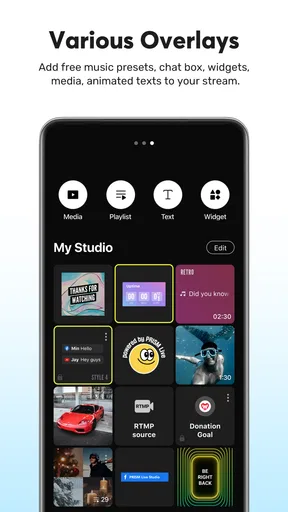
One useful way to approach the app is to treat overlays as information, not decoration. A chat layer or alert can help viewers feel included, but too much on-screen material can compete with the game or the person speaking. I would start with only the elements that serve a clear purpose, then add more only if they make the stream easier to follow. This is especially important on a phone screen, where the creator is already managing the broadcast through a compact interface.
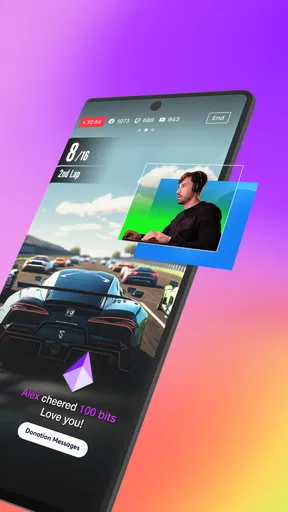
For gaming, I would think through the session from the viewer’s perspective before pressing go live. If the game itself fills the screen, an overlay needs to remain readable without hiding important action. For an IRL stream, the priorities change: stable framing and intelligible speech matter more than decorative effects. A setup that looks lively in a preview can become cluttered once the real scene starts moving, so a restrained first layout is often the safer choice.
Worth Reading Before You Choose

Flipboard Shows What News Apps Must Do Beyond the Feed

Switching to Android Auto Means Rethinking Your Driving Routine

Google Calendar Makes a Crowded Week Easier to Manage

Ludo King Makes the Most of the Minutes Between Plans

Baby Panda World Brings Quick Play to Modern Phones, but Its Game Library Feels Busy

ESPN’s Live Game View Makes Following Close Games Easier
There is also a useful distinction between streaming to several audiences and serving each audience well. Simultaneous broadcasting can save the effort of choosing one destination, but it does not remove the work of following conversations or adapting to different communities. If I cannot keep up with chat across platforms, a single destination may produce a more attentive and relaxed stream. Reach is not automatically the same as connection.
Who will get the most from it
I’d recommend trying PRISM Live Studio if you already have a reason to go live and want a phone-centered way to bring presentation and interaction together. It is a plausible fit for a creator who streams occasionally, a gamer who wants to share a session without arranging a desktop setup, or someone who likes spontaneous live updates. It is less compelling for a person who mainly watches videos, records private clips, or has no interest in talking with a live audience; in those cases, a regular camera or video app may be a simpler match.
It may also be the wrong choice if the stream needs a highly controlled production or if the creator prefers to avoid managing comments while broadcasting. The best fit is not necessarily the person with the most ambitious plans, but someone whose routine genuinely benefits from going live on a phone. Before committing to a complex setup, I’d test whether I enjoy the actual habit of showing up and interacting; extra presentation options cannot make an unwanted routine sustainable.
Getting Started with PRISM Live Studio
The first thing you'll notice about PRISM Live Studio is its intuitive interface. It’s designed to be user-friendly, meaning even if you’re not tech-savvy, you won’t find yourself lost in a sea of options. After downloading the app, available for both Android and iOS, you're greeted with a simple setup process. Just link your social media accounts, and you're ready to go live to your audience.
Features That Stand Out
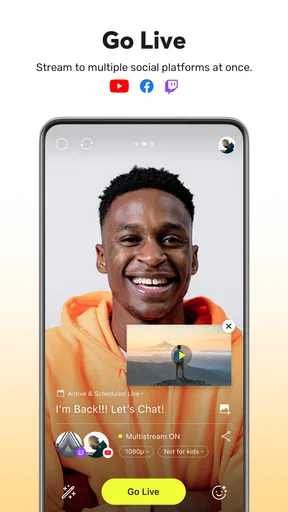
One of the standout features of this app is its multi-stream capability. You can broadcast simultaneously across various platforms like YouTube, Twitch, and Facebook. This means no more choosing between audiences; you can engage with everyone at once. Trust me, this is a game-changer for anyone serious about building their online presence.
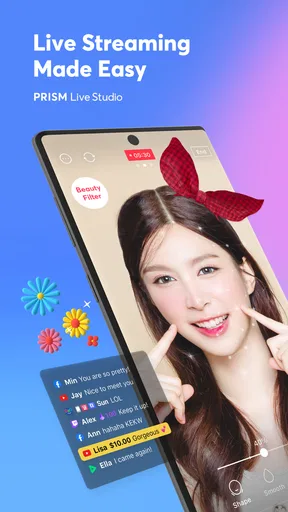
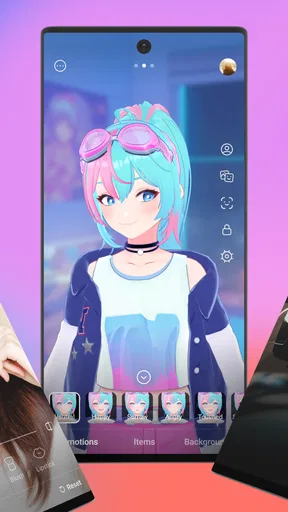
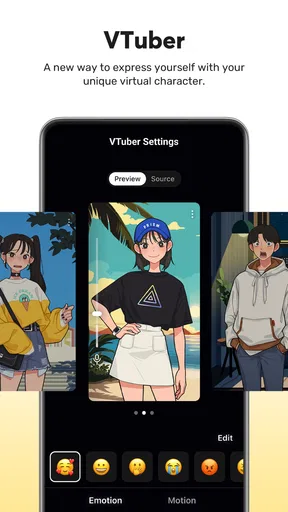
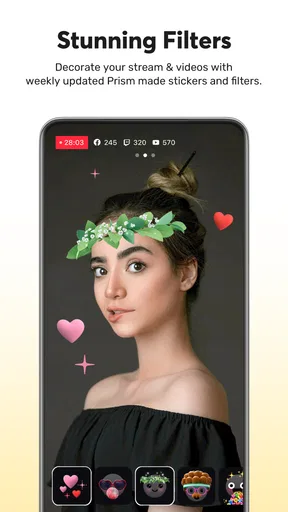
Another feature worth mentioning is the extensive list of effects and filters. Whether you want to jazz up your gaming stream with quirky overlays or keep it professional with sleek, minimalistic effects, PRISM Live Studio has you covered. The app offers a range of customization options that let you personalize your stream to reflect your style.
Performance and Usability
Let’s talk about performance. In my experience, the app runs smoothly without noticeable lag, which is crucial when you’re live-streaming. The last thing you want is a glitchy stream that leaves your audience frustrated. The video quality is top-notch, supporting up to 1080p, ensuring your content looks sharp and professional.
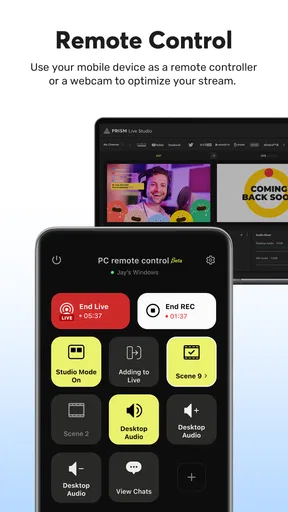
Usability is another area where this app shines. The controls are intuitive, and the learning curve is minimal. Whether you're adjusting audio levels or switching between scenes, everything is just a tap away. This ease of use makes it a favorite among both beginners and experienced streamers.
Engagement and Interaction
Engaging with your audience is a breeze with PRISM Live Studio. The app allows real-time interaction with viewers through chat overlays, which can be customized to suit your stream’s aesthetic. This feature is essential for maintaining viewer engagement and building a community around your content.
Moreover, the app supports various widgets like donation alerts and subscriber notifications, which are crucial for streamers looking to monetize their content. These widgets are easy to set up and integrate seamlessly into your stream.
Keeping the routine sustainable
The recurring value comes from reducing the number of separate steps between deciding to stream and actually beginning. If I use the app regularly, I would keep a familiar basic setup rather than redesigning every broadcast. That makes it easier to focus on the conversation or game, and it gives viewers a consistent experience. The temptation to keep tweaking effects can be fun at first, but it can also turn a quick live session into a preparation task.
A realistic routine might be a creator finishing work, setting the phone in a stable position, checking the scene and sound, then streaming a short game session while responding to chat. The same person could use a simpler arrangement for a walk or a casual update, where movement and surroundings matter more than visual polish. In both cases, I’d avoid treating every stream as an event that needs a perfect layout. A setup that is easy to repeat is more valuable than one that looks impressive but takes too much effort to maintain.
What can become tiring
Live streaming has a social workload that an edited video does not. I need to keep speaking, notice audience messages and handle the small interruptions that naturally happen during a broadcast. Even with on-screen tools, those jobs compete for attention. If I want to play a game privately or record something I can edit later, a recording app or a conventional video workflow is likely the better choice.
There is also a presentation trade-off: effects and overlays can help establish a recognizable style, but they can age poorly or distract from the content if I keep adding them without a reason. I would review the setup occasionally and remove anything that no longer helps. That kind of light maintenance is more sustainable than constantly chasing a new look, and it keeps the stream legible for people watching on small screens.
Costs, compatibility and expectations
The app is free to install, while optional in-app purchases range from $9.99 to $79.99 per item. I would begin with the free experience and only consider spending once I know which part of my routine needs more. A purchase makes little sense just because a feature looks attractive in a menu; it should solve a recurring problem or support a format I genuinely use. This is a practical way to avoid paying for a streaming habit I have not yet established.
PRISM Live Studio is developed by NAVER Corp. It has a 4.5 average from around 102,000 ratings, with over 5 million installs and around 1,400 written reviews. The current version is 5.1.5, it requires Android 10 or later, and its content rating is Teen. Those details make it worth checking device compatibility before planning a stream, particularly if the phone is older. The app is free to start, but a smooth experience still depends on the device, connection and the creator’s own setup.
Maintenance matters more than novelty
For a lasting place on my phone, a streaming app needs to be useful on ordinary days, not only when I am experimenting with effects. I would keep the account connections and on-screen layout as simple as the intended stream allows, then do a brief check before each session. That small routine helps catch practical problems without turning preparation into a second job. If I stop going live, the app’s value naturally falls; it is a tool for a particular habit, not a general-purpose video editor for every situation.
My long-term advice is to judge it by how often it helps you start a stream you actually want to make. If mobile broadcasting is part of your plans, its mix of platform access, customization and live interaction can earn a regular spot. If you rarely want to be live, or prefer carefully edited videos and a more controlled production, the extra streaming controls may sit unused. That is not a flaw so much as a reminder to choose around your real routine.
Final Thoughts
In a nutshell, PRISM Live Studio is a robust app that caters to both gamers and lifestyle streamers. Its user-friendly interface, coupled with powerful features, makes it an excellent choice for anyone looking to step up their streaming game. Whether you’re streaming your latest gaming victory or sharing a day in your life, this app provides the tools you need to create engaging, high-quality content.
So there you have it, folks! If you're in the market for a reliable, feature-rich streaming app, give PRISM Live Studio a try. It’s a decision you won’t regret.
Pros
- User-friendly interface for easy navigation.
- High-quality streaming with minimal lag.
- Wide range of filters and effects.
- Customizable overlays for personalization.
- Supports multi-streaming to various platforms.
Cons
- Requires a stable internet connection.
- Limited features on the free version.
- Occasional app crashes reported.
- High battery consumption during use.
- Some features require in-app purchases.
FAQs for PRISM Live Studio: Games & IRL
What is PRISM Live Studio: Games & IRL used for?
PRISM Live Studio: Games & IRL is a versatile streaming app designed for both video creators and gamers. It enables users to broadcast live video content with ease, supporting multiple platforms like YouTube, Twitch, and Facebook. The app offers a variety of features such as real-time effects, overlays, and multi-streaming capabilities, making it ideal for enhancing live broadcasts.
Is PRISM Live Studio compatible with all devices?
PRISM Live Studio is available for both Android and iOS devices. However, the app's performance may vary depending on the device's specifications. Users with older devices or lower processing power might experience limitations in streaming quality or app functionality. It's recommended to check the app's compatibility with your device's OS version before downloading.
Does PRISM Live Studio offer free features, or is it subscription-based?
PRISM Live Studio offers a range of free features, including basic streaming tools and effects. While many functions are accessible without cost, the app also provides premium features through in-app purchases. These premium options allow for enhanced streaming capabilities and additional customization, making them suitable for users seeking advanced broadcasting tools.
How user-friendly is PRISM Live Studio for beginners?
PRISM Live Studio is designed with an intuitive interface that caters to both beginners and advanced users. The app includes straightforward navigation and easy-to-use tools, helping new users quickly learn to broadcast live. Additionally, the app offers tutorials and support to assist users in maximizing their streaming experience, making it accessible for all skill levels.
Can PRISM Live Studio be used for professional streaming?
Yes, PRISM Live Studio is equipped with features suitable for professional streaming. It supports high-quality video and audio, multi-platform streaming, and customizable overlays, making it a powerful tool for serious streamers. Professionals can take advantage of the app's advanced editing tools and real-time effects to create polished and engaging live content.


